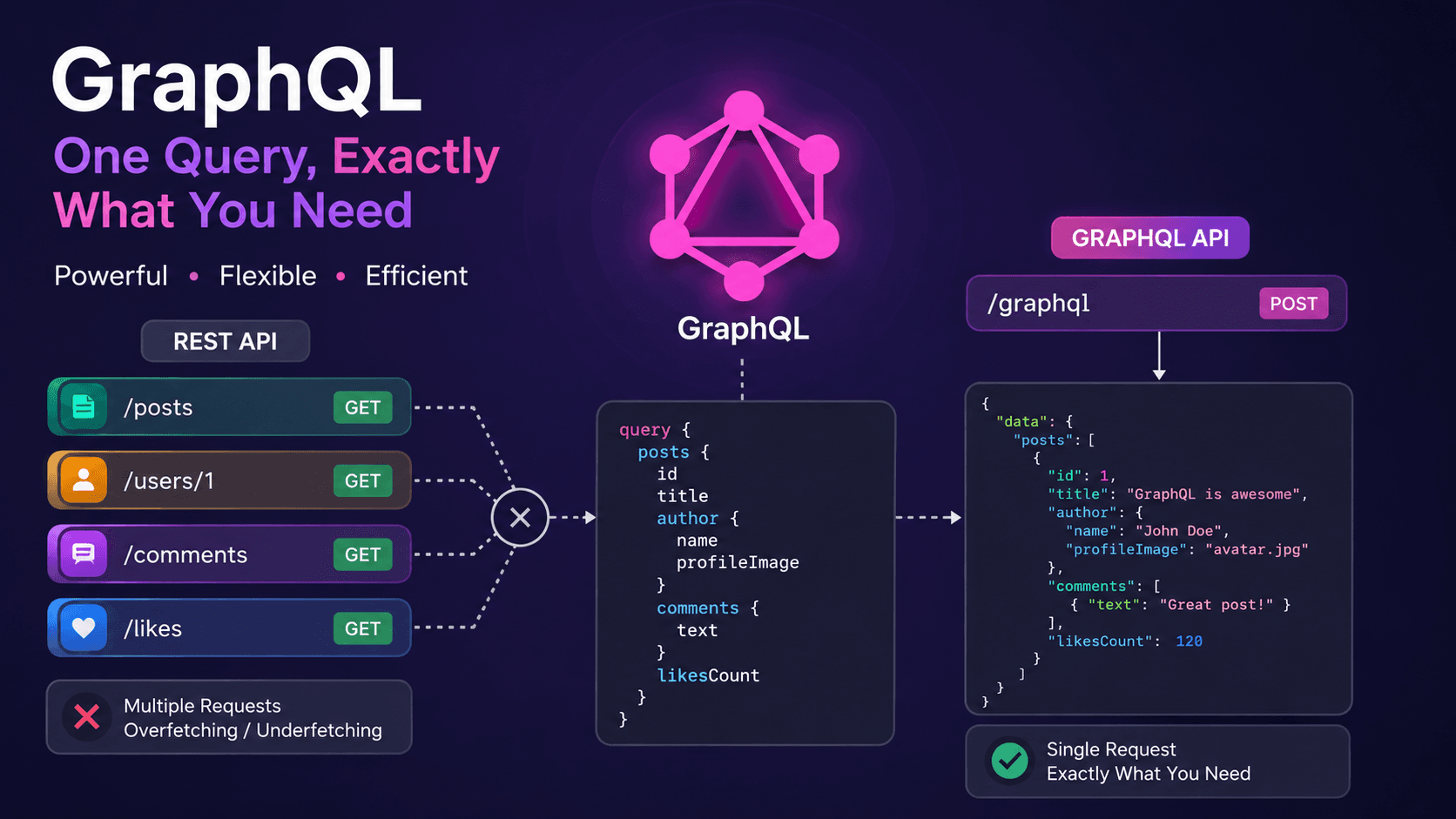

Understanding GraphQL Completely: Why It Was Introduced, How It Works, Queries, Mutations, Resolvers, React Integration, Security, and GraphQL vs REST API
When developers start backend development, most of us begin with REST APIs. REST APIs are still powerful and widely used today.
But as applications become larger and more dynamic, one common problem starts appearing:
“Why am I making so many API requests just to render ONE page?”🤔
That exact problem is one of the biggest reasons GraphQL was introduced.
In this article, we will deeply understand:
- What problem GraphQL solves
- Overfetching and underfetching
- How GraphQL works internally
- GraphQL queries and mutations
- Resolvers
- GraphQL types
- CRUD operations
- GraphQL security
- GraphQL Context
- React.js integration
- GraphQL vs REST API
- How GraphQL reduces frontend complexity
What Problem Did GraphQL Solve?
Imagine you are building a social media application.
You want to display:
- Post title
- Post image
- Author name
- Author profile image
In REST API
Usually, the frontend first requests the posts.
GET /posts
Response:
[
  {
    "id": 1,
    "title": "Learning GraphQL",
    "image": "post.jpg",
    "authorId": 10
  }
]
Now the frontend gets the authorId. But it still needs the author's details.
So another request is sent:
GET /users/10
Response:
{
  "id": 10,
  "name": "Sudip Sharma",
  "profileImage": "profile.jpg"
}
The Real Problem
To render ONE page, multiple API requests were needed.
Imagine:
- 10 posts
- 10 users
- Comments
- Likes
- Categories
Now the frontend may hit many endpoints.
This creates:
- More network requests
- Slower frontend performance
- Complex frontend logic
- Harder state management
This is one of the biggest reasons GraphQL became popular.
Understanding Overfetching
Sometimes REST APIs send MORE data than we actually need.
GET /users/10
Response:
{
  "id": 10,
  "name": "Sudip Sharma",
  "email": "[email protected]",
  "phone": "9800000000",
  "address": "Pokhara",
  "bio": "Developer",
  "profileImage": "profile.jpg"
}
But maybe the frontend only needed:
{
  "name": "Sudip Sharma"
}
Everything else is unnecessary data.
This is called:
Overfetching = Getting MORE data than needed.
Understanding Underfetching
Now imagine:
GET /posts
returns only post data.
But the frontend also needs:
- User information
- Comments
- Likes
So more requests are needed.
This is called:
Underfetching = Not getting enough data in a single request. 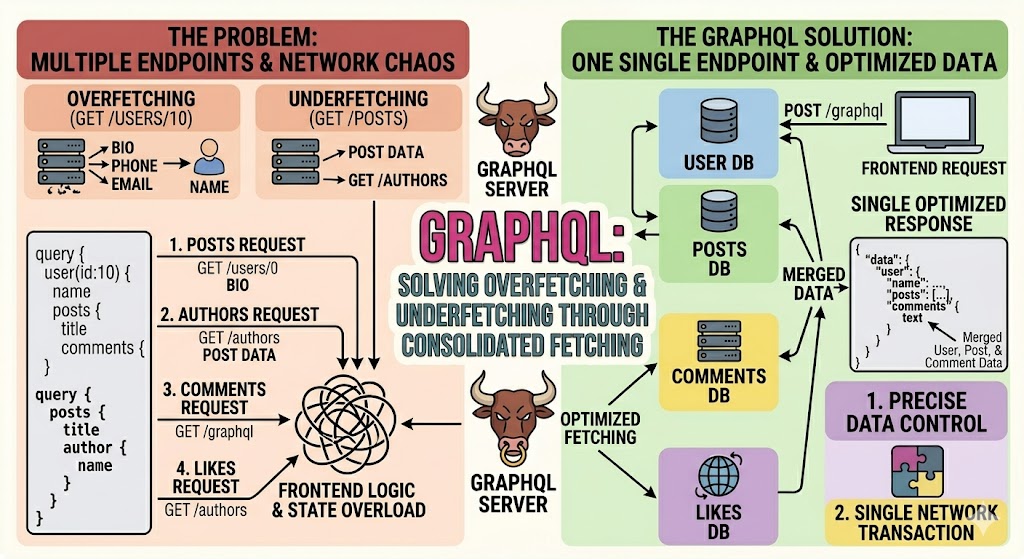
The Problem vs. The GraphQL Solution
Introduction to GraphQL
GraphQL was developed by Facebook (now Meta) to solve these problems.
GraphQL allows the frontend to request EXACTLY the data it needs.
Instead of multiple endpoints like:
/posts
/users
/comments
GraphQL usually provides a single endpoint:
/graphql
The frontend decides what data should come back.
GraphQL Is NOT Magic
One of the biggest misunderstandings beginners have is:
“GraphQL automatically makes applications faster.”
Not exactly.
GraphQL mainly helps:
- Reduce frontend complexity
- Reduce unnecessary API calls
- Make data fetching easier
- Improve frontend network handling
- Give flexible control over returned data
Internally, GraphQL still works similarly to REST APIs.
How GraphQL Works Internally
Even though the frontend sends ONE request:
POST /graphql
Internally GraphQL still:
- Calls database queries
- Executes functions
- Runs resolvers
- Fetches related model data
- Combines responses
So GraphQL does NOT magically remove backend logic.
It simply creates a better communication layer between:
- Frontend
- Backend
How GraphQL Solves the Problem
Example Query:
query {
  posts {
    title
    image

    author {
      name
      profileImage
    }
  }
}
Response:
{
  "data": {
    "posts": [
      {
        "title": "Learning GraphQL",
        "image": "post.jpg",
        "author": {
          "name": "Sudip Sharma",
          "profileImage": "profile.jpg"
        }
      }
    ]
  }
}
Notice something important?
We got:
- Post data
- User data
inside ONE request.
That is one of the biggest advantages of GraphQL.
GraphQL Structure
GraphQL mainly works with:
- Schema
- Types
- Queries
- Mutations
- Resolvers
Understanding GraphQL Types
1. Object Type
Defines the structure of an object.
type User {
  id: ID
  name: String
  email: String
}
Another example:
type Post {
  id: ID
  title: String
  image: String
}
2. Args Type
Arguments are conditions passed into queries.
type Query {
  getPost(id: ID!): Post
}
Query example:
query {
  getPost(id: 1) {
    title
  }
}
3. Input Type
Input types are mainly used in mutations.
input CreatePostInput {
  title: String!
  image: String!
}
Used like this:
type Mutation {
  createPost(data: CreatePostInput!): Post
}
Understanding Queries in GraphQL
Queries are used to GET data.
Similar to:
GET
in REST APIs.
Example:
query {
  posts {
    id
    title
  }
}
Understanding Mutations in GraphQL
Mutations are used to:
- Create
- Update
- Delete
Similar to:
- POST
- PUT
- PATCH
- DELETE
in REST APIs.
Create Mutation
mutation {
  createPost(
    data: {
      title: "Learning GraphQL"
      image: "post.jpg"
    }
  ) {
    id
    title
  }
}
Update Mutation
mutation {
  updatePost(
    id: 1
    data: {
      title: "Updated Title"
    }
  ) {
    id
    title
  }
}
Delete Mutation
mutation {
  deletePost(id: 1) {
    id
  }
}
CRUD Operations in GraphQL
OperationGraphQLREST Equivalent CreateMutationPOST ReadQueryGET UpdateMutationPUT/PATCH DeleteMutationDELETE Understanding Resolvers
Resolvers are one of the MOST IMPORTANT parts of GraphQL.
A resolver is simply a function that fetches data.
const resolvers = {
  Query: {
    posts: async () => {
      return await Post.find()
    }
  }
}
Resolvers for Related Model Data
Now comes the powerful part.
Imagine:
A post contains:
authorId
But we also want author details inside the post query.
GraphQL resolvers can automatically fetch related model data.
Post Schema
{
  title: "GraphQL",
  authorId: "123"
}
Resolver Example
const resolvers = {
  Post: {
    author: async (parent) => {
      return await User.findById(parent.authorId)
    }
  }
}
Query Example
query {
  posts {
    title

    author {
      name
      email
    }
  }
}
What Happened Internally?
GraphQL:
- Fetched posts
- Saw author field
- Triggered resolver
- Fetched user data
- Combined everything
- Returned ONE final response
So the frontend does NOT need another request.
GraphQL Internal Working Flow
Client Request
      ↓
GraphQL Server
      ↓
Schema Validation
      ↓
Resolver Execution
      ↓
Database/API Calls
      ↓
Combined Response
      ↓
Client
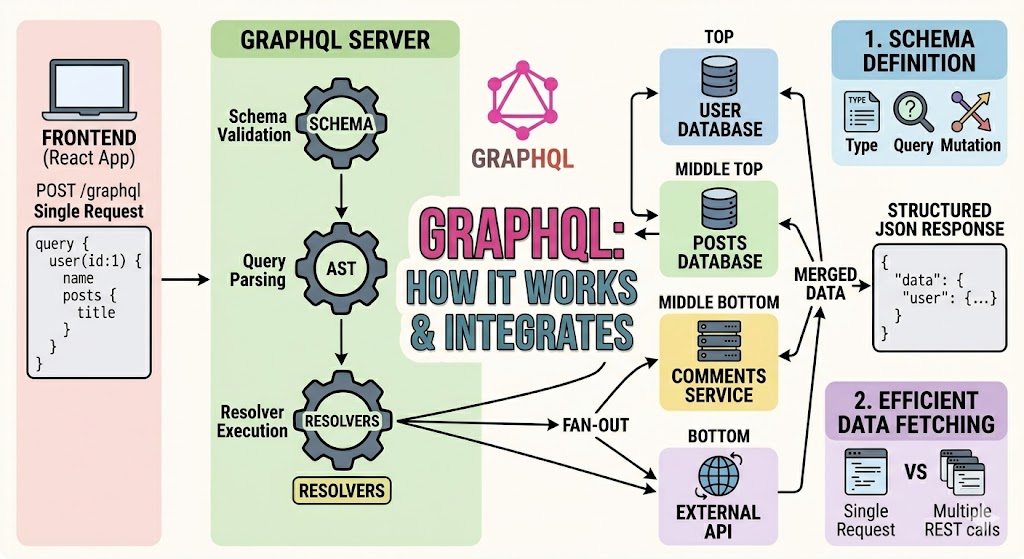
How Resolvers Merge Data Internally GraphQL Endpoint Structure
Unlike REST APIs with many routes:
/posts
/users
/comments
GraphQL usually uses ONE endpoint:
/graphql
The operation details are sent inside the request body.
Example GraphQL Request Body
{
  "query": "
    query {
      posts {
        title
      }
    }
  "
}
GraphQL Security
Because everything goes through:
/graphql
security becomes very important.
1. CORS Configuration
Allow only trusted frontend domains.
app.enableCors({
  origin: ["https://yourfrontend.com"],
  credentials: true
})
2. Authentication
Use:
- JWT
- Middleware
- Guards
same like REST APIs.
3. HTTPS
Always use HTTPS in production.
Protected Routes in GraphQL
const isAuth = (context) => {
  if (!context.user) {
    throw new Error("Unauthorized")
  }
}
Protected Mutation Example
createPost: async (_, args, context) => {
  isAuth(context)

  return await Post.create(args.data)
}
Understanding GraphQL Context
Context is VERY important in GraphQL.
It allows us to access:
- req
- res
- cookies
- user information
- tokens
inside resolvers.
Context Example
GraphQLModule.forRoot({
  context: ({ req, res }) => ({
    req,
    res
  })
})
Now inside resolvers:
const token = context.req.cookies.token
How React.js Handles GraphQL Requests
In React.js, GraphQL requests are commonly handled using:
- Apollo Client
- fetch()
- Axios
Apollo Client is the most popular solution.
GraphQL Request Using fetch()
const getPosts = async () => {
  const response = await fetch("http://localhost:3000/graphql", {
    method: "POST",

    headers: {
      "Content-Type": "application/json"
    },

    body: JSON.stringify({
      query: `
        query {
          posts {
            title
          }
        }
      `
    })
  })

  const result = await response.json()

  console.log(result)
}
Returned Response
{
  "data": {
    "posts": [
      {
        "title": "Learning GraphQL"
      }
    ]
  }
}
Apollo Client Setup in React.js
Installation
npm install @apollo/client graphql
Apollo Configuration
import {
  ApolloClient,
  InMemoryCache,
  ApolloProvider
} from "@apollo/client"

const client = new ApolloClient({
  uri: "http://localhost:3000/graphql",
  cache: new InMemoryCache()
})
Query Example in React
import { gql, useQuery } from "@apollo/client"

const GET_POSTS = gql`
  query {
    posts {
      title
    }
  }
`

function Posts() {
  const { loading, error, data } = useQuery(GET_POSTS)

  if (loading) return <p>Loading...</p>

  if (error) return <p>Error</p>

  return (
    <div>
      {data.posts.map((post, index) => (
        <h1 key={index}>{post.title}</h1>
      ))}
    </div>
  )
}
GraphQL vs REST API
FeatureREST APIGraphQL Multiple EndpointsYesNo Single EndpointNoYes OverfetchingCommonAvoided UnderfetchingCommonAvoided Frontend ControlLessMore Flexible ResponseLimitedVery Flexible Learning CurveEasierSlightly Higher Why Frontend Developers Like GraphQL
GraphQL helps frontend developers:
- Control response structure
- Avoid unnecessary data
- Reduce multiple API calls
- Handle related data easily
- Simplify frontend logic
- Reduce network complexity
But GraphQL Also Has Challenges
- Slightly harder learning curve
- Complex backend setup
- Resolver optimization needed
- Bad queries can become expensive
- Caching is harder than REST
Final Understanding of GraphQL
The most realistic understanding is:
GraphQL is NOT magic. It does not automatically remove backend complexity.
Instead:
- It organizes data fetching better
- Makes frontend development cleaner
- Reduces unnecessary API calls
- Allows flexible data fetching
- Combines related data into ONE response
Internally, it still:
- Executes functions
- Calls databases
- Uses resolvers
- Fetches related models
- Processes authentication
just like normal backend systems.
Best Simple Definition of GraphQL
“GraphQL is a query language for APIs that allows the frontend to request exactly the data it needs through a single endpoint.”
Final Conclusion
GraphQL was introduced to solve problems like:
- Multiple API calls on one page
- Overfetching
- Underfetching
- Complex frontend data handling
With GraphQL:
- The frontend controls the data
- Related data can come in ONE request
- Resolvers can fetch related model data automatically
- APIs become more flexible and optimized
- Frontend network handling becomes easier
The most important practical takeaway is:
“GraphQL reduces frontend complexity more than backend complexity.”
And once you understand:
- Queries
- Mutations
- Types
- Resolvers
- Context
- Frontend integration
GraphQL becomes much easier to understand.