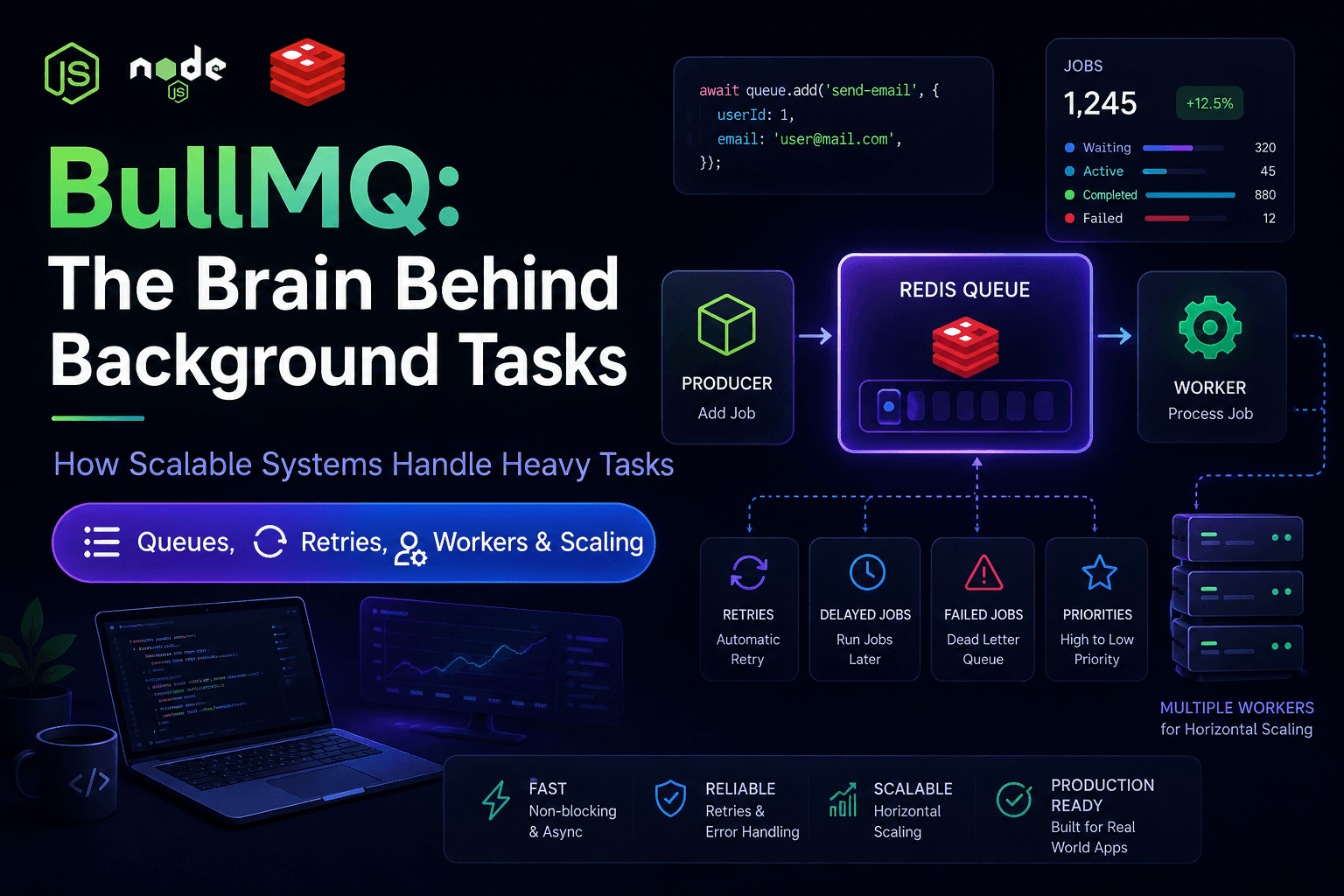

BullMQ: The Brain Behind Background Tasks | Node.js & NestJS Queue SystemBullMQ
How Scalable Systems Handle Heavy Tasks
Queues, Retries, Workers & Scaling
Introduction
Modern backend applications are not just about handling API requests anymore.
Real-world systems need to process:
- Emails
- Notifications
- Payment processing
- Image optimization
- Analytics pipelines
- Scheduled tasks
- Background API calls
If all these heavy operations run directly inside the API request, the application becomes slow and unstable.
This is where BullMQ becomes extremely powerful.
What is BullMQ?
BullMQ is a Redis-based message queue library built for Node.js applications.
Its main purpose is simple:
Queue tasks and process them later in the background.
Instead of forcing users to wait for long-running tasks, BullMQ moves those heavy operations into workers.
Why Modern Applications Need BullMQ
Without Queue System
User Request
   ↓
API Server
   ↓
Send Email
Resize Image
Generate Thumbnail
Store Analytics
Call External APIs
   ↓
Response Delayed
Problems:
- Slow APIs
- Timeout issues
- Server overload
- Poor scalability
- Bad user experience
With BullMQ
User Request
   ↓
API Server
   ↓
Add Job to Queue
   ↓
Immediate Response
   ↓
Worker Processes Job Later
This creates:
- Fast APIs
- Better scalability
- Reliable retries
- Background processing
- Improved performance
Queue vs Pub/Sub
Both Queue and Pub/Sub are messaging patterns, but they solve different problems.
| Feature | Queue (BullMQ) | Pub/Sub |
|---|---|---|
| Message Delivery | One job is processed by one worker only | One message is delivered to multiple subscribers |
| Processing | Single consumer processes the task | Many subscribers can react to the same event |
| Reliability | High reliability with retries & recovery | Lower reliability compared to queues |
| Primary Use Case | Background task processing | Broadcasting events & notifications |
| Best Example | Email processing, image resizing | Live chat updates, notifications |
| Persistence | Jobs remain until processed | Messages can be lost if subscriber is offline |
Core Features of BullMQ
- Delayed Jobs – Jobs that are added to the queue but only become available for processing after a specified delay (e.g., send a reminder 1 hour later)
- Scheduled Jobs - Jobs that repeat on a cron-like schedule (e.g., generate a report every day at midnight)
- Retry Failed Jobs - When a job fails (due to a temporary error), BullMQ automatically retries it a configurable number of times before giving up
- Priority Queues - Jobs can be assigned priorities; higher priority jobs jump the line and get processed before lower priority ones
- Concurrency Control -Controls how many jobs a single worker can process at the same time (e.g., process 5 emails simultaneously)
- Rate Limiting -Restricts how many jobs can be processed within a sliding time window (e.g., max 100 jobs per minute to protect an external API)
- Worker Recovery - If a worker crashes while processing a job, BullMQ detects the stalled job and reassigns it to another healthy worker
- Queue Monitoring- Built-in tools (like Bull Board) to see queue length, job statuses, failures, and retry counts in real time
- Dead Letter Queue- A separate queue where jobs go after all retries are exhausted, so you can later inspect and debug what went wrong
- Job Dependencies- Allows you to define parent-child relationships between jobs (e.g., a parent job runs only after all its child jobs complete)
Real-World Use Cases of BullMQ
- Sending verification emails
- Background image processing
- Generating reports
- Payment processing
- Video encoding
- Scheduled notifications
- Analytics processing
- Rate-limited API operations
- Microservice communication
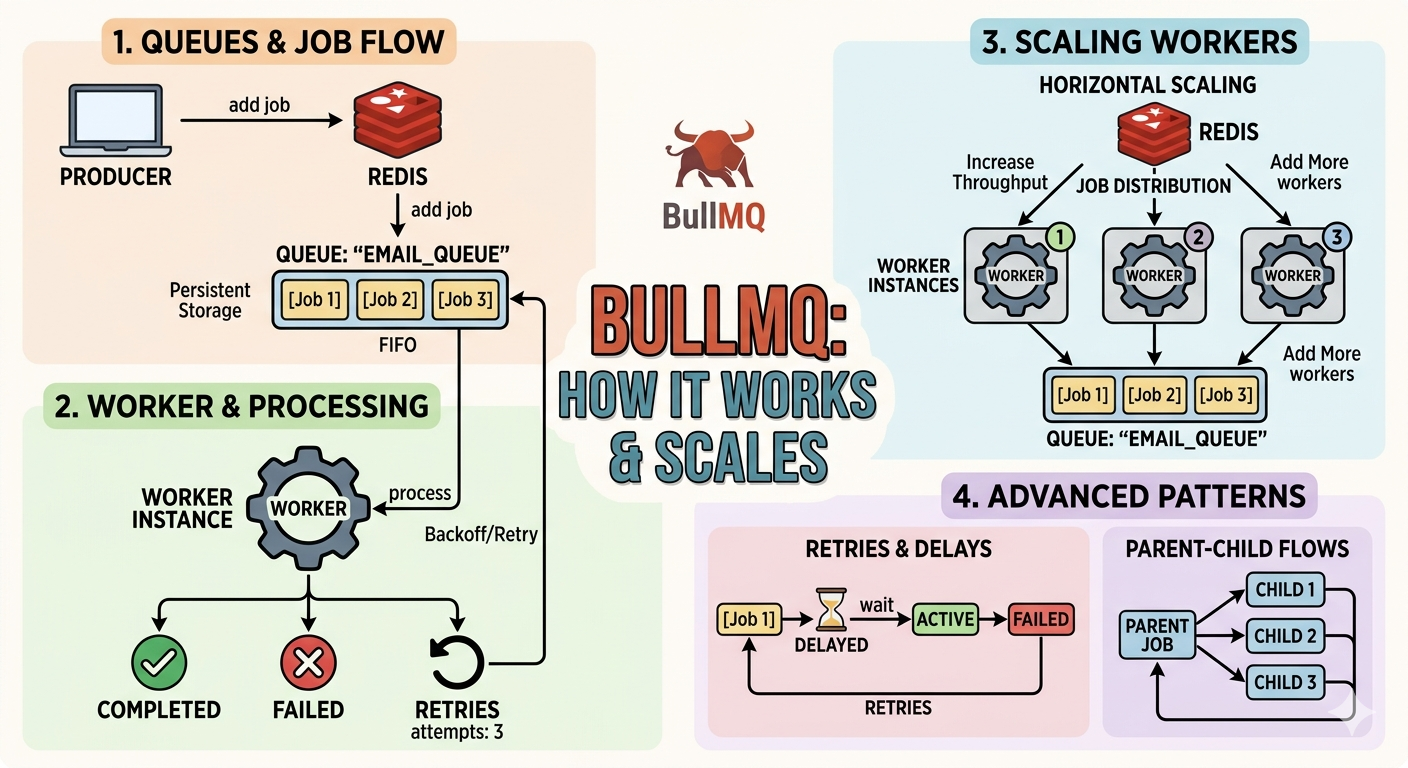
BullMQ Architecture
[ Producer ] ---> [ Queue (Redis) ] ---> [ Worker ]
                        |
                    [ Events ]
                        |
                [ QueueScheduler ]
1. Producer
Producer creates jobs and adds them to the queue.
queue.add('sendEmail', {
  userId: 1,
});
2. Queue
Queue stores jobs inside Redis.
Job States
- waiting → Job added but not processed
- active → Worker processing the job
- completed → Successfully completed
- failed → Job failed
- delayed → Scheduled for future execution
3. Worker
Worker processes jobs from the queue.
new Worker('emailQueue', async (job) => {

  console.log(job.data);

});
Responsibilities of Worker
- Pick jobs from queue
- Execute tasks
- Retry failed jobs
- Mark success or failure
4. QueueScheduler
QueueScheduler handles:
- Delayed jobs
- Retries
- Stalled jobs
- Recovery mechanism
new QueueScheduler('emailQueue');
5. Queue Events
queueEvents.on('completed', ({ jobId }) => {

  console.log('Job Completed:', jobId);

});
Production-Level Concepts You Must Learn
1. Retry & Backoff
Temporary failures are common in distributed systems.
queue.add('sendEmail', data, {

  attempts: 5,

  backoff: {
    type: 'exponential',
    delay: 2000,
  },

});
Retry Flow
- 1st retry → 2 seconds
- 2nd retry → 4 seconds
- 3rd retry → 8 seconds
- 4th retry → 16 seconds
2. Dead Letter Queue (DLQ)
Stores permanently failed jobs for later inspection.
Main Queue → Retry → Failed → Dead Letter Queue
3. Idempotency
Idempotency means:
Running the same job multiple times should not create duplicate effects.
Real Problem
If retries happen or workers crash, the same email job may execute multiple times.
Without idempotency:
- Duplicate emails may send
- Duplicate payments may happen
- Duplicate database updates may occur
Solution Using jobId
await loginQueue.add(
  'email-job',
  {
    email,
    lastLogin: userData.lastLogin,
  },
  {
    jobId: `email-job-${email}`,
  },
);
How This Works
BullMQ checks the jobId before adding a new job.
If the same jobId already exists, BullMQ ignores the duplicate request.
Example:
[email protected]
This prevents duplicate processing.
4. Concurrency Control
new Worker('emailQueue', processor, {
  concurrency: 5,
});
This processes 5 jobs simultaneously.
Possible Problems
- Race conditions
- Database conflicts
- Resource exhaustion
5. Worker Crash Recovery
BullMQ detects stalled jobs automatically.
If worker crashes:
- Job becomes stalled
- QueueScheduler detects it
- Job gets re-added to queue
- Another worker processes it
6. Rate Limiting
limiter: {
  max: 100,
  duration: 60000,
}
Only 100 jobs run per minute.
7. Delayed Jobs
queue.add('reminder', data, {
  delay: 1000 * 60 * 60,
});
Executes after 1 hour.
8. Stalled Jobs
Stalled jobs happen when worker crashes during processing.
BullMQ automatically recovers them.
9. Queue Monitoring
Production systems need monitoring for:
- Queue size
- Failed jobs
- Retry counts
- Worker health
- Processing speed
10. Queue Cleanup
removeOnComplete: 1000,
removeOnFail: 5000,
Keeps Redis memory optimized.
11. Job Priorities
priority: 1
Lower number means higher priority.
12. Job Dependencies (Flows)
Parent Job
   ├── Child Job A
   ├── Child Job B
   └── Child Job C
13. Separate Workers
emailWorker
paymentWorker
imageWorker
analyticsWorker
Each worker scales independently.
14. Distributed Systems Thinking
BullMQ teaches:
- Retries
- Fault tolerance
- Eventual consistency
- Message duplication handling
- Worker recovery
15. Backpressure Handling
What happens when jobs arrive faster than workers can process?
Solutions:
- Rate limiting
- Horizontal scaling
- Multiple workers
- Queue partitioning
16. Exactly-Once vs At-Least-Once
BullMQ guarantees:
At-least-once processing
This means jobs may execute more than once, which is why idempotency is critical.
17. Job Timeout
timeout: 30000
Automatically fails jobs running longer than 30 seconds.
18. Multi Queue Design
emailQueue
paymentQueue
imageQueue
analyticsQueue
19. Observability
Production systems need:
- Logs
- Metrics
- Alerts
- Tracing
20. Security & Isolation
- Validate payloads
- Protect Redis
- Separate critical queues
- Encrypt sensitive data
BullMQ in NestJS
Install Packages
npm install @nestjs/bullmq bullmq ioredis
Configure BullMQ
BullModule.forRoot({
  connection: {
    host: 'localhost',
    port: 6379,
  },
});
Register Queue
BullModule.registerQueue({
  name: 'emailQueue',
});
Producer Example
@Injectable()
export class EmailService {

  constructor(
    @InjectQueue('emailQueue')
    private emailQueue: Queue,
  ) {}

  async sendEmail(data: any) {

    await this.emailQueue.add(
      'sendEmail',
      data,
      {
        attempts: 5,

        backoff: {
          type: 'exponential',
          delay: 3000,
        },
      },
    );
  }
}
Worker Example
@Processor('emailQueue')
export class EmailProcessor extends WorkerHost {

  async process(job: Job): Promise {

    console.log(job.data);

    return true;
  }
}
Practical Implementation Repository
For complete practical implementation of:
- Retries
- Delayed Jobs
- Concurrency
- Rate Limiting
- Idempotency
- Dead Letter Queue
- Workers
- Queue Events
- Production-Level BullMQ Concepts
Refer to the GitHub repository:
github.com/sudipsharma826/bullmq-message-queue
Final Thoughts
BullMQ is not just a queue library.
It teaches real backend engineering concepts used in scalable systems.
By learning BullMQ, you also learn:
- Distributed systems
- Fault tolerance
- Background processing
- Scalable architecture
- Worker management
- Production-level backend design
If you are serious about becoming a backend engineer, BullMQ is one of the most valuable tools to learn in the Node.js ecosystem.